


How to Do Your Own Bookkeeping as a Small Business Owner (Step-by-Step)
Updated: 3 days ago
Learning how to do your own bookkeeping as a small business owner is more realistic than most people think. You don't need a finance background or an expensive certification. You need a clear process, consistent habits, and a system that organizes information as you go. The business owners who successfully manage their own books aren't necessarily numbers people. They're people who found a workflow that takes minutes instead of hours.
This post breaks bookkeeping into the daily, weekly, and monthly tasks that keep your finances organized without taking over your life. You'll see exactly what each task involves, how long it realistically takes, and at what point you might want professional support. If you've been telling yourself you'll "deal with it later" or that bookkeeping is too complicated for a non-accountant, this is your permission slip to start.

What DIY Bookkeeping Actually Means for Small Business Owners
Bookkeeping, at its core, is the practice of recording and organizing your financial transactions. That's it. Every dollar that comes in gets recorded. Every dollar that goes out gets recorded. Each transaction gets assigned to a category so you can see patterns, generate reports, and prepare for taxes.
The reason it feels overwhelming is that most people picture bookkeeping as the entire stack: recording transactions, reconciling accounts, preparing financial statements, calculating taxes, and filing reports. In reality, a small business owner doing their own bookkeeping only needs to handle the first two or three layers. The rest can be handed to a professional at tax time with clean, organized records that make their job faster and cheaper.
DIY bookkeeping for beginners comes down to three core habits: categorizing transactions as they come in, reconciling your accounts regularly, and reviewing your numbers monthly to understand how your business is performing. If you can do those three things consistently, you have functional bookkeeping.
The goal isn't to become an accountant. The goal is to maintain clear, organized records that give you visibility into your business and make professional support less expensive when you need it.
The Daily Bookkeeping Tasks (5 Minutes or Less)
Daily bookkeeping sounds intense, but it's actually the lightest lift of the three.
On most days, you're doing one thing: saving your receipts.
If you make a business purchase, capture the receipt. This can be a photo on your phone, a forwarded email receipt, or a PDF download. The point is to have documentation attached to the transaction before you forget what it was for. Two weeks from now, a $47.83 charge at an office supply store might be obvious. A $127.00 charge at a generic-sounding online retailer might not be.
That's the daily task. Some days it takes zero minutes because you didn't make any business purchases. Other days it takes two minutes because you bought supplies and need to snap a photo. Money Mastery has a built-in receipt attachment feature that lets you upload PNGs, JPEGs, and PDFs directly to transactions. They're stored in a custom folder in your Drive, linked to the specific transaction, and accessible whenever you need them for reference or tax documentation.
The other daily habit, if you want to stay ahead, is a quick glance at your bank account. Not to analyze anything. Just to confirm nothing unexpected showed up. This takes 30 seconds and builds the awareness muscle that makes everything else easier.
The Weekly Bookkeeping Tasks (10 to 15 Minutes)
This is where the real work of self-employed bookkeeping lives. Once a week, you sit down and handle three things: review new transactions, categorize them, and flag anything that needs attention.
Review New Transactions
Pull up your bank account or financial system and look at everything that's come through since your last review. For most small business owners, this is somewhere between 10 and 40 transactions per week. You're not analyzing them yet. You're just seeing what's there.
Categorize Each Transaction
This is the core of bookkeeping. Each transaction gets assigned to a specific category: advertising, software, professional services, office supplies, meals (business), and so on. The more specific your categories, the more useful your records become at tax time and for understanding your business performance.
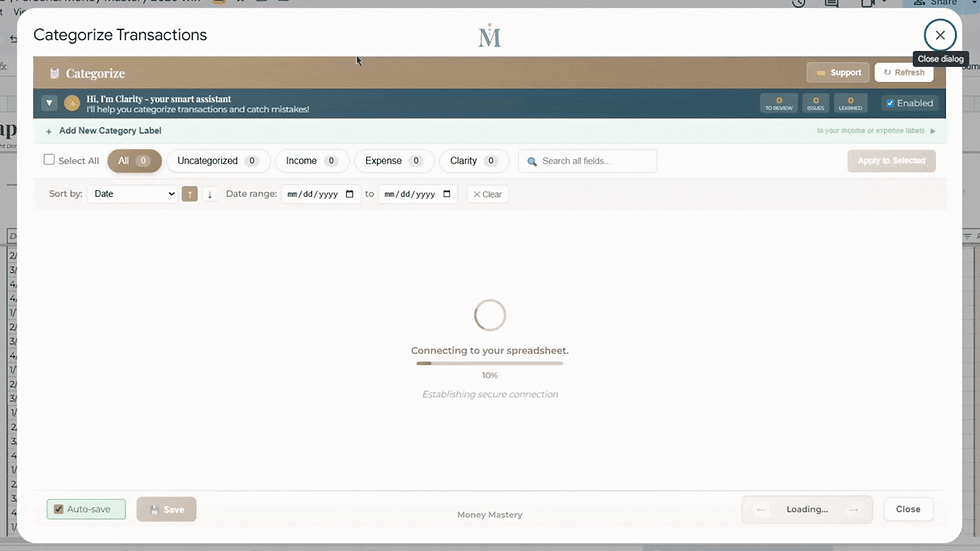
If you're using a system with AI-powered categorization, like Clarity AI in Money Mastery, a significant portion of this work is done for you. Clarity AI learns your spending patterns over time and suggests categories based on your transaction history. The more you use it, the more accurate it gets. For recurring charges like your monthly software subscriptions or regular vendor payments, the system learns quickly and starts auto-suggesting the correct category within the first month or two.
For transactions that don't fit neatly into one category, you'll want a way to split them. A $300 order from Amazon that included $180 in office supplies and $120 in packaging materials should be split into two categories, not lumped into one. Money Mastery supports up to four splits per transaction, and each split gets its own category assignment so your records stay precise.
Flag Anything Unusual
As you're reviewing and categorizing, keep an eye out for charges you don't recognize, amounts that seem wrong, or subscriptions you forgot about. Flag these for follow-up. This is how you catch errors early, before they compound into bigger problems at year-end.
Download the free Money Mastery Net Worth Tracker at https://moneymastery-system.com/free. It puts your personal and business accounts side by side across sixty account types and twelve tabs, and it stays yours.
The Monthly Bookkeeping Tasks (30 to 45 Minutes)
Once a month, you zoom out. This is where you go from recording transactions to actually understanding what they mean for your business. Monthly bookkeeping involves four tasks: reconciliation, reporting, review, and planning.
Reconcile Your Accounts
Account reconciliation means confirming that the transactions in your tracking system match what your bank shows. This catches duplicate entries, missed transactions, or errors in categorization. If you're doing your weekly reviews consistently, reconciliation usually takes just a few minutes because you've already been keeping things current.
Money Mastery automatically calculates your current balance based on uploaded transactions and your starting balance, making reconciliation straightforward. You can compare what the system shows against your actual bank balance and investigate any discrepancies.
Generate Your Reports
At minimum, you want to look at your profit and loss (P&L) statement each month. This shows your total income, total expenses, and net profit or loss for the period. It tells you whether your business made money or lost money, and which categories contributed most to each side.
Money Mastery generates P&L reports automatically from your categorized transactions. You can also run reports by account, by category, by needs vs. desires, and even build custom reports through Clarity AI where you ask specific questions about your financial data and select which data points to include.
Review for Patterns
Look at your expenses by category. Compare this month to last month. Are any categories growing unexpectedly? Is your income trending up or down? Are there expenses you could reduce or eliminate? This review is what turns bookkeeping from data entry into a business intelligence tool.
The yearly overview in Money Mastery breaks down all your income and expense categories month over month, showing percentages and totals so you can spot trends without doing any manual calculations.
Plan the Next Month
Based on what you see in your review, make one or two adjustments. Maybe you noticed a subscription that's no longer providing value. Maybe your advertising spend increased but your revenue didn't follow. Maybe you need to set aside more for quarterly taxes. Write down your one or two action items and move on.

What You Can Handle Yourself vs. When to Call a Professional
Small business bookkeeping basics that most owners can manage on their own include transaction categorization, receipt organization, account reconciliation, and basic report review. These are the tasks covered above, and they're well within reach for anyone willing to spend 15 minutes a week and 30 to 45 minutes a month.
Here's where professional help becomes valuable:
Tax preparation and filing is the most common handoff point. Even if you keep perfect records all year, the actual preparation and filing of business taxes involves enough complexity that most business owners benefit from a CPA or tax preparer. The good news is that when you hand them clean, categorized records, their work goes faster, which means you pay less.
Payroll processing is another area where professional support or dedicated software makes sense if you have employees. The tax implications of payroll errors are significant enough that this is worth outsourcing for most small businesses.
Complex transactions like loans, investments, depreciation of assets, or multi-entity structures usually warrant professional guidance. If you're not sure whether a transaction is complex, that's a good indicator to ask a professional.
The key insight here: doing your own bookkeeping doesn't mean doing ALL your own financial management. It means handling the daily, weekly, and monthly organization so that when you do need a professional, you're handing them a clean, organized system instead of a shoebox of receipts. That difference alone can save you hundreds or thousands of dollars per year in professional fees.
This is general information about bookkeeping practices, not financial or tax advice. Consult a qualified professional for guidance specific to your situation.
Setting Up Your DIY Bookkeeping System
If you're starting from scratch, here's the setup process that gets you from "nothing organized" to "functional system" in under an hour.
Choose Your Categories
You need income categories and expense categories. For income, most small business owners have between 3 and 10 sources: client payments, product sales, passive income, affiliate commissions, and so on. For expenses, you want enough specificity to see patterns without so many categories that sorting becomes a chore.
Money Mastery provides up to 5 main income labels with 25 sub-categories and 40 main expense labels with up to 400 sub-categories. You don't need to use all of them on day one. Start with the categories that match how you actually earn and spend, then add more as your needs become clearer. The system lets you build at your own pace.
Connect Your Accounts
Decide which accounts you'll track. At minimum, include your primary business checking account and any credit cards used for business purchases. Most small business owners have between 3 and 7 accounts that need tracking.
Money Mastery supports up to 10 linked accounts and can process CSV, Excel, and PDF bank statements. You upload your transaction files to the Account Upload Center, select the date, description, and amount columns, and the system processes them into your accounts. No manual data entry required for the transactions themselves.
Build Your Routine
Decide when your weekly review happens. Put it on your calendar. Treat it like any other business appointment. The 15 minutes you invest weekly prevents the multi-hour monthly or quarterly scramble that causes most people to fall behind and eventually abandon their bookkeeping entirely.

How Money Mastery Makes DIY Bookkeeping Faster
Most people who try DIY bookkeeping and quit do so because the process is tedious, not because it's difficult. The actual decisions (is this expense advertising or professional development?) are simple. The tedium comes from manually entering data, hunting for the right category in a long dropdown, and building reports from scratch.
This is where Money Mastery was specifically designed to remove friction.
Transaction import handles the data entry. Instead of typing in every purchase manually, you upload your bank statements (CSV, Excel, or PDF) and the Account Upload Center processes them into your system. Date, description, and amount are populated automatically.
Clarity AI handles the repetitive categorization. Once it learns that your monthly Zoom charge always goes under "Software Subscriptions" and your weekly coffee meeting always goes under "Meals (Business)," it starts suggesting those categories automatically. The learning compounds over time, meaning your weekly review gets shorter every month.
The categorization model handles bulk processing. Instead of categorizing transactions one at a time, you can select multiple similar transactions and apply a category to all of them at once. For a month where you had 15 transactions at the same gas station or 8 charges from the same vendor, this is a significant time saver.
Reports are generated automatically. You don't build a P&L from scratch. You click into Clarity AI and Reports, select the report type, filter by date or category, and the system produces it from your already-categorized data. You can run all transactions, profit and loss, needs and desires, monthly trends, account breakdowns, or even custom reports where you ask specific questions
.
The net result: what takes most people an hour or more per week with a basic spreadsheet takes Money Mastery users 10 to 15 minutes because the system eliminates the repetitive manual work and keeps everything organized in one place.

Your First Week of DIY Bookkeeping Starts Now
You don't need to master all of this at once. Here's your action plan for this week:
Today, pick the one bank account or credit card where most of your business transactions happen. Pull up the last 30 days of transactions. Look at them. That's it for today.
Tomorrow, start categorizing those transactions. Use the 35 business expense categories from our complete category list as a starting point. Don't overthink it. If a transaction could fit two categories, pick the one that feels most useful and move on.
By the end of this week, you'll have one month of categorized transactions. That's functional bookkeeping. It's not perfect, but it's real, and it's a foundation you can build on every single week going forward.
In our previous posts, we covered how to track where your money goes and how to separate business and personal finances. Tomorrow, we'll talk about the needs vs. desires framework that helps you understand not just where your money goes, but whether your spending aligns with what actually matters to you.
Get your free Net Worth Tracker and see where your money actually goes, in 15 minutes. https://moneymastery-system.com/free
Bookkeeping for a Home-Based Business: What Changes
Bookkeeping for a home-based business follows the same daily, weekly and monthly rhythm as any other business. Three things change: you have shared costs that are part personal and part business, you have no separate office bill to anchor your overhead, and nobody else is checking your work. Those three are where home-based books usually go wrong.
Shared costs come first. Internet, phone, electricity and rent or mortgage are used by both the household and the business. The usual approach is to record the full amount as personal and claim a business share separately, rather than splitting every bill inside your books each month. Pick the share once, write down how you worked it out, and keep that note with your records.
Second, your overhead is quieter than an office-based owner's, so it drifts. Software subscriptions, a second phone line, a shared streaming account used for client work: none of them arrive as one obvious bill. Review the recurring charges on every account once a quarter rather than waiting for an annual surprise.
Third, build the check in. A home-based owner has no bookkeeper looking over their shoulder, so the monthly reconciliation is the only thing standing between a small error and a year of bad numbers. Reconcile every account to its statement each month, and heading into year end, work through what to do in Q4 so tax season is not a crisis so nothing is left to January.
Frequently Asked Questions
How long does DIY bookkeeping take each week?
For most small business owners with 10 to 40 transactions per week, the weekly review and categorization takes 10 to 15 minutes. Monthly review and reconciliation adds another 30 to 45 minutes once a month. The total time commitment is roughly one hour per month once you have a consistent system in place. Using AI-powered tools like Clarity AI in Money Mastery reduces this further as the system learns your patterns.
Can I do my own bookkeeping without accounting software?
Yes. You can do basic bookkeeping with a spreadsheet, a notebook, or a system like Money Mastery that's built in Google Sheets with custom automation. Traditional accounting software like QuickBooks is one option, but it's not the only path. What matters is that you have a consistent method for recording, categorizing, and reviewing transactions. The best tool is the one you'll actually use every week.
What's the biggest mistake people make with DIY bookkeeping?
The most common mistake is inconsistency. People start strong, miss a week, then two weeks, then a month passes, and suddenly they're facing hundreds of uncategorized transactions. This is what causes the overwhelm that makes people quit. The solution is a short, non-negotiable weekly appointment with your finances. Fifteen minutes weekly is always easier than four hours quarterly.
When should I hire a bookkeeper instead of doing it myself?
Consider hiring a bookkeeper if you have more than 200 transactions per month, if you have employees (payroll adds significant complexity), if you're spending more than an hour a week on bookkeeping, or if the stress of managing it yourself is causing you to avoid your finances entirely. Many business owners find a middle path: they handle weekly categorization themselves and hire a bookkeeper for monthly reconciliation and year-end tax preparation.
Do I still need an accountant if I do my own bookkeeping?
In most cases, yes. Bookkeeping (recording and organizing transactions) and accounting (interpreting data, preparing taxes, strategic financial planning) are different functions. Doing your own bookkeeping means you handle the daily organization so your accountant has clean records to work with. This typically reduces your accounting fees because they spend less time organizing and more time doing the skilled work you're paying them for.
If you would like to talk it through with someone, Donna Roggio is a business coach with fifteen years of experience helping women sort this out, and a first call with her is free.
Related Posts:
How do you do bookkeeping for a home-based business?
Use the same daily, weekly and monthly routine as any small business, then handle three extras. Record shared household costs at full value and claim a business share separately. Review recurring subscriptions quarterly, because home-based overhead drifts quietly. Reconcile every account monthly, because nobody else is checking your work.
How do you do your own bookkeeping when you are self-employed?
Open a separate account for business money, categorise every transaction weekly, and reconcile monthly against the statement. Self-employed bookkeeping differs from employed bookkeeping in one way that matters: you are responsible for setting aside your own tax, so treat the set-aside as a fixed monthly task rather than something you do at year end.


Comments